
What's New: August 2026
July was about agents, the API, and the incidents engine. August is about staying in the loop — notifications that reach you wherever you are, finding anything in a keystroke, and knowing exactly who gets paged before it happens. Plus open sign-up, flexible billing, private tickets, and a spam-screened inbox.
Notifications & the bell. Every important event now lands in an in-app notification centre: a ticket assigned to you, a customer reply, a new unassigned ticket anyone can pick up, an incident mirrored to a component you own, an SLA going at-risk, or a ticket reopened. Sidebar counts update live, each person controls exactly which events reach them, and an email backstop catches anything you miss while you're away.
Notifications on your phone and desktop. Install StayUpfront as an app (iOS, Android, and desktop) and get web push notifications — including proper iOS lock-screen taps that open straight to the ticket or incident. No app store required.
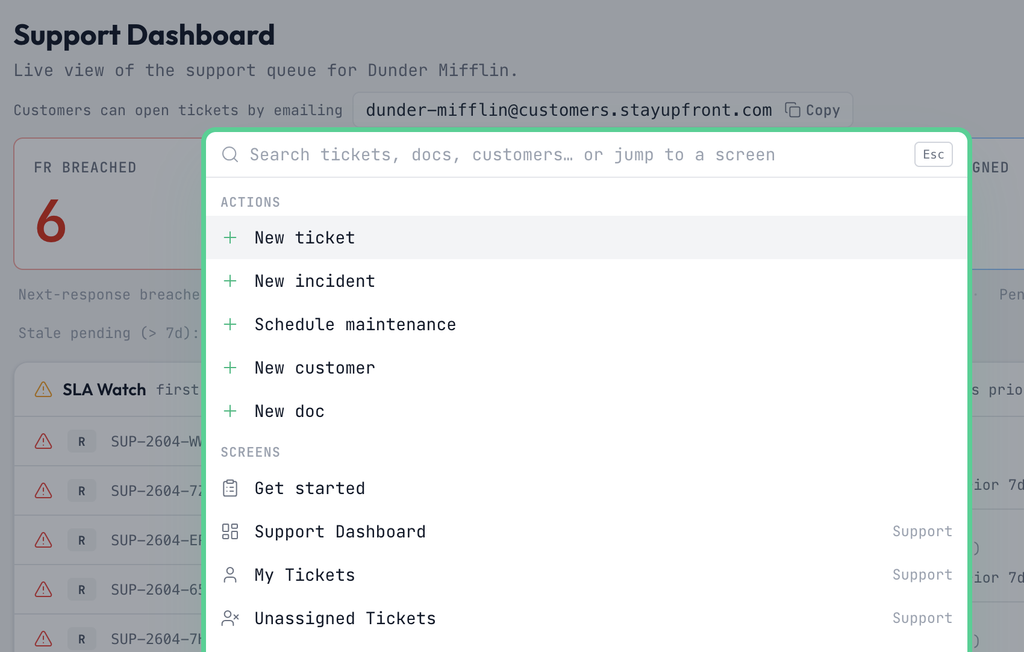
Search everything (⌘K). A global command palette searches across tickets, customers, incidents, docs, monitors, and settings — and jumps you straight there. Press ⌘K from anywhere.
Alert preview: see who gets paged before it happens. Open any monitor and preview the exact alert chain — which people and channels get notified, in what order, with escalation fallbacks — all from one decision engine that also drives real alerts, so the preview is the truth. Silent monitors are flagged right on the checks list ("Pages no one", "No incident") so nothing fails quietly.
Customer Sync. Keep your customer list in step with your own systems automatically: upsert customers by your external reference over the API, or point a webhook at Stay Upfront and have sign-ups, plan changes, and churn flow straight in. Deprovisioned accounts soft-close cleanly. The new Webhooks page shows the exact payload shapes.
Customer Health & Engagement (beta). Two explainable, at-a-glance signals on every customer — one for friction and risk, one for how present and active they are — so you can spot an account going quiet before it becomes a problem.
Private support tickets. Tickets can now be private to the requester, with a clear All / Private visibility control staff can flip from the ticket itself. Set a default for your whole organisation.
Customers rate and close their own tickets. Portal customers can close a resolved ticket with a one-tap satisfaction rating, and your support dashboard now reflects how customers are feeling.
A spam-screened support inbox. Email-origin tickets pass through envelope-hygiene and an AI spam gate before they reach your queue. Spam drops out of every list and stat with a one-click "Not spam" undo, and staff can always view the raw email behind any ticket.
Open sign-up and a guided start. You can now create an organisation and start a 14-day trial in minutes — no waitlist. New teams get a numbered, skippable getting-started journey: set up monitoring, wire your first alert rule and response team, connect your support inbox, invite teammates, and publish your first content — each step teaching as it goes.
Flexible billing. Pricing now speaks GBP, USD, and EUR — checkout locks in your currency on first subscription. Annual billing is live with one month free. Change plans any time (upgrades apply immediately, downgrades at renewal), and cancel in-app whenever you like.
Bring your own portal analytics. Point your status page at your own Fathom, Plausible, or Google Analytics — configured with structured IDs, never a paste-in script box, so your portal stays fast and safe.
Sharper web checks. Uptime health is now region-aware — a single passing region is enough to prove your site was up, and the failing-region threshold counts distinct regions rather than individual probes. Checks also record and show the full redirect chain, with curl-measured timing on every hop.
Weekly email that matches your status page. The weekly summary's uptime numbers now line up exactly with what your status page shows, and each figure explains what it means.