What's New: September & October 2026
September and October were about the support desk: a calmer way to reply, a queue that keeps itself current, and an inbox that stays clean. Alongside those, incidents got a rebuild (Incidents: every change is an update), Una learned to write your replies (Reply with Una), and your emails got your name on them (Your name on every email). Each of those has its own post. Here's everything else.
The Respond screen. Send now opens a short screen that shows the message one last time and asks what happens next: wait for the customer, keep working, or resolve it as Solved, Roadmap, Duplicate or Won't do.
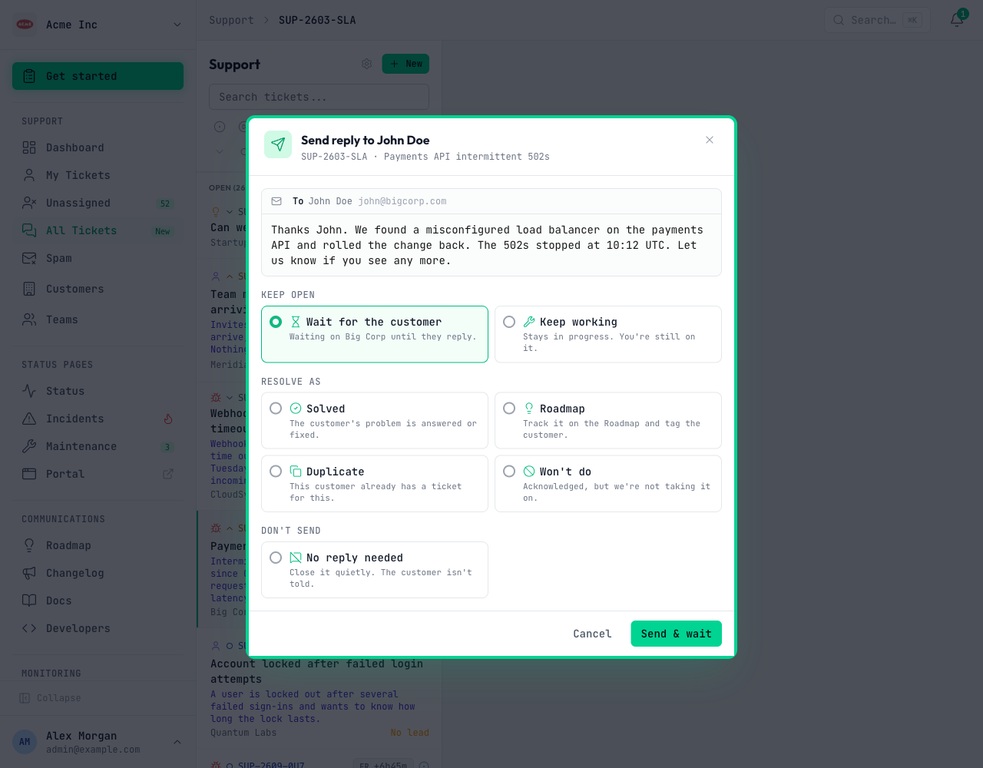
No reply needed. Close a ticket quietly when there's nothing to say, such as an unsolicited sales pitch. The customer isn't emailed and your SLA figures aren't touched.
One conversation. Customer messages, team notes and Una's work share a single timeline. Hide team notes folds your team's side into one row when you just want the customer's story.
A ticket list that keeps up. The support list now updates on its own: new tickets appear, resolved ones leave, and your filters stay put. A ticket Una is still reading shows at the top straight away, so you know it's there. Moving between tickets is quicker too.
A Spam page. Everything kept out of your queue is in one place, each with a plain-words reason. View the original email, mark it Not spam, or allow a sender for good.
Tickets without a subject. Your portal's new-ticket form now just asks "What's happening?", and Una gives the ticket a title once she's read it.
No SLA, explained. A ticket with no SLA says so, and hovering tells you why.
Your team on the portal. There's one Sign in for everyone. Your own team can raise and follow internal tickets from the portal or by email, just like a customer.
Portal sign-in that fits you. Anyone can now sign in to your portal with a code sent by email, or you can limit sign-in to your customers' contacts in Settings → Support. The Customers page shows recent sign-in attempts, so a contact who couldn't get in doesn't go unnoticed.
Friendlier portal edges. Error pages carry your portal's branding and a way to sign in. Older browsers, including iOS 16, see a gentle warning instead of being turned away.
Clearer web checks. Assertion rules read as sentences ("Fail when $.status isn't ok"), JSON responses are pretty-printed, and a failed text match shows the text that actually came back.
Domains on every TLD. Domain expiry checks now work for every top-level domain, including .app and .dev. SSL errors are written in plain English, and resolving a DNS-change incident no longer raises it again.
Search from anywhere. Press / to open search, as well as ⌘K.
Under the hood. We've tightened how attachments and portal sign-ins are kept separate between organisations, and made sure HTML in an incoming email can never run as live content.